QuickSketch
A downloadable tool for Windows and Linux
## QuickSketch - Gesture Drawing Practice Tool
### Master gesture drawing with timed reference images
QuickSketch is a focused gesture drawing practice application designed to help artists improve their speed, accuracy, and confidence through timed drawing exercises.
---
### ✨ Features
**⏱️ Timed Sessions**
- Customizable timer (1-999 seconds per image)
- Visual countdown with color-coded urgency (green → yellow → red)
- Skip images instantly with spacebar
**🖼️ Smart Image Management**
- Load images from any folder with 2-level subfolder support
- Duplicate detection prevents reloading same images
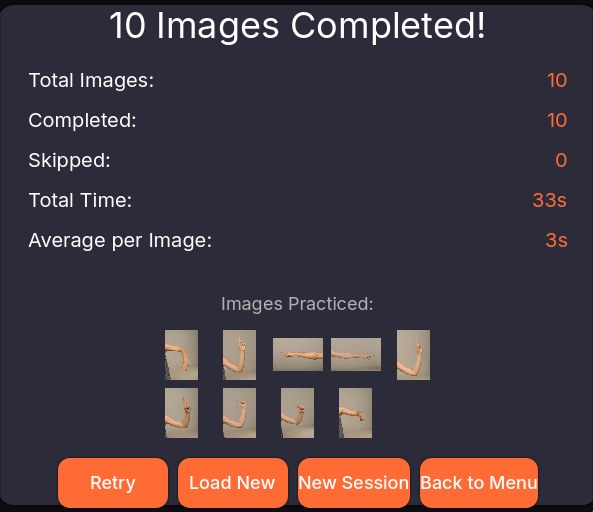
- Session history with thumbnail gallery
- Support for PNG, JPG, JPEG, and WebP formats
**📊 Progress Tracking**
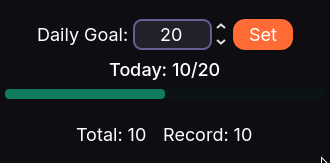
- Daily drawing goals with progress bars
- Total images drawn across all sessions
- Best day tracking
- Session statistics (completed, skipped, time spent)
**🎨 Customizable Experience**
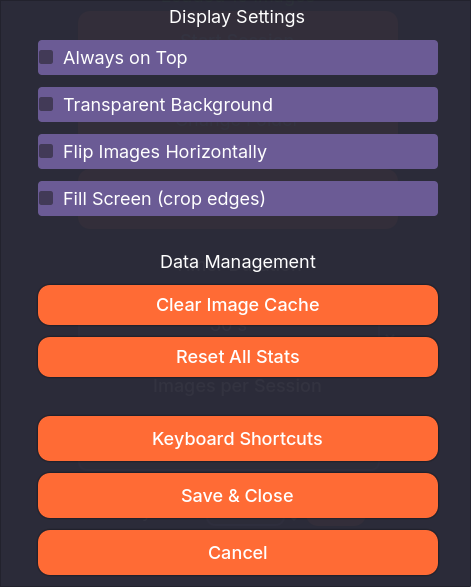
- Adjustable window size
- Always-on-top mode for reference
- Transparent background option
- Horizontal flip for mirror practice
- Fill screen or fit image display modes
**⌨️ Keyboard Shortcuts**
- Space: Skip current image
- Escape: Pause/Resume session
---
### 📖 How to Use
1. **Load Images:** Click "Load Images" and select a folder with reference images
2. **Set Timer:** Choose how long you want per image (30-60 seconds recommended)
3. **Set Count:** Select how many images to practice with
4. **Start Session:** Click "Start Session" and begin drawing!
5. **Track Progress:** View stats and set daily goals to stay motivated
---
### 💻 System Requirements
**Windows:** Windows 7 or newer, 64-bit
**Linux:** 64-bit distribution with X11 or Wayland works too
**Minimum:** 2GB RAM, any modern GPU
**Recommended:** 4GB RAM for large image collections
---
### 🎯 Perfect For
- Art students practicing gesture drawing
- Illustrators warming up before work
- Animators studying poses
- Anyone wanting to improve drawing speed and accuracy
---
### 🛠️ Built With
- Godot 4.6
---
### 📸 Screenshots
*Screenshots should be captured showing:*
1. Main menu with loaded images
2. Active drawing session with timer
3. Session summary with stats
4. Settings menu with options
---
### 📝 Release Notes
**Version 1.0**
- Initial release
- Timed gesture drawing sessions
- Progress tracking and statistics
- Image history and gallery
- Cross-platform (Windows & Linux)
---
### 💬 Feedback
Found a bug? Have a feature request? Leave a comment or check the GitHub repository!
---
*Thank you for supporting independent tools!* 🎨
Download
Install instructions
📥 Download & Install Instructions
System Requirements
Windows:
- Windows 7/8/10/11 (64-bit)
- 2GB RAM minimum (4GB recommended)
- Any modern GPU with OpenGL 3.3 support
- ~100MB disk space
Linux:
- 64-bit distribution (Ubuntu 18.04+, Fedora, etc.)
- X11 display server (Wayland support varies)
- 2GB RAM minimum
- ~70MB disk space
- May need: libgl1-mesa-glx or equivalent OpenGL libraries
---
🖥️ Windows Installation
Option 1: Direct Download (Recommended)
1. Download QuickSketch-Windows.zip
2. Extract the zip file to any folder (e.g., Documents/QuickSketch/)
3. Double-click QuickSketch.exe to run
4. Optional: Create desktop shortcut by right-clicking → "Create shortcut"
Option 3: Portable (No Install)
- The zip is fully portable
- Just extract and run from USB drive or any location
- No registry entries or system modifications
---
🐧 Linux Installation
Step 1: Download
# Download QuickSketch-Linux.zip
# Extract it
unzip QuickSketch-Linux.zip -d ~/QuickSketch/
Step 2: Make Executable
cd ~/QuickSketch/
chmod +x QuickSketch.x86_64
Step 3: Run
./QuickSketch.x86_64
Optional: Create Desktop Entry
Create file ~/.local/share/applications/quicksketch.desktop:
[Desktop Entry]
Name=QuickSketch
Comment=Gesture Drawing Practice Tool
Exec=/home/USERNAME/QuickSketch/QuickSketch.x86_64
Icon=/home/USERNAME/QuickSketch/icon.png
Type=Application
Categories=Graphics;Education;
Optional: Add to PATH
# Add to ~/.bashrc
export PATH="$HOME/QuickSketch:$PATH"
# Then run with: QuickSketch.x86_64
---
📝 First-Time Setup
Recommended Initial Configuration:
1. Load Images: Click "Load Images" and select your reference image folder
2. Set Timer: 30-60 seconds per image is good for beginners
3. Set Count: Start with 10-20 images per session
4. Start Drawing: Click "Start Session" and begin!
Tips:
- Use Spacebar to skip difficult poses
- Press Escape to pause if you need a break
- Set a daily goal to track progress
- Enable "Always on Top" if using a separate drawing tablet/software
Leave a comment
Log in with itch.io to leave a comment.